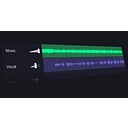
What is Vocal Remover and how does it work?
Vocal Remover uses AI source separation to analyze an audio file and output separated stems — typically vocals isolated and instrumentals isolated, sometimes individual instrument stems (drums, bass, melody). Users upload an audio file (MP3, WAV), the AI processes it, and they download the separated tracks. The free version handles most consumer use cases without payment.
Vocal Remover standout strengths
The free access point is genuinely generous. LALAL.AI and similar tools charge per minute of audio; Vocal Remover provides separation without payment for standard use cases. For creators who need to extract an instrumental from a popular song for a cover video, create karaoke backing tracks, or sample check before purchasing a license, the free tier solves the need completely. The web-based interface removes all technical friction.
Vocal Remover weaknesses and drawbacks
LALAL.AI, Spleeter (open source), and Moises App offer better separation quality for demanding use cases. Professional music production work — where artifacts in the separated stems would be audible in a final mix — requires paid professional-grade tools. Vocal Remover is excellent for content creation, casual use, and checking whether a separation is going to work; it's not a mastering-studio tool.
Vocal Remover pricing & plans (2026)
Free with optional paid tier. Best for: content creators, musicians, and audio hobbyists who need vocal/instrumental separation for covers, karaoke, sampling, or remix work.
Who is Vocal Remover best for?
| User type |
Why it fits |
Considerations |
| Content creators making cover videos |
Instrumental separation for background tracks |
Check copyright — tool doesn't grant usage rights |
| Music producers / remixers |
Useful for quick stem checks |
Professional separation needs LALAL.AI or Spleeter |
| Karaoke creators |
Perfect use case for instrumental extraction |
Quality varies by song |
Vocal Remover review: final verdict
Vocal Remover is the right starting point for AI stem separation — it's free, fast, and good enough for most content creator use cases. For professional production quality, upgrade to LALAL.AI.